Most eCommerce teams invest heavily in getting the click, but far less in what happens after the order is placed. Yet mapping and improving the post-purchase journey can increase customer satisfaction by up to 20%, grow revenue, and cut service costs at the same time. A clear post‑purchase journey map shows every touchpoint from “order confirmed” through delivery and returns, and gives you a practical blueprint for higher customer satisfaction.
Key Takeaways
| Question | Answer |
|---|---|
| What is a post‑purchase journey map? | A visual and detailed outline of every interaction customers have after buying—order confirmation, tracking, delivery, returns, and re‑engagement. For foundations, see this guide on the post-purchase experience. |
| Why does it matter for satisfaction? | It reduces anxiety, uncertainty, and effort. Real‑time tracking and proactive updates, like centralized shipment tracking, keep customers informed and confident. |
| What tools help map and manage the journey? | Use specialized post‑purchase platforms such as self‑service order tracking, branded tracking portals, and customer engagement analytics to connect each step. |
| How do I identify key touchpoints? | Walk through the journey from the customer’s perspective—from order confirmation to returns—and list the moments where they need clarity, such as shipment events or returns instructions. The article below breaks this down step‑by‑step. |
| How can I turn tracking into a growth channel? | Replace carrier pages with a branded tracking portal that presents recommendations, content, and offers alongside tracking information. |
| How do I measure the impact of my journey map? | Use customer engagement analytics to track click‑throughs, engagement with notifications, repeat visits to tracking pages, and downstream purchases. |
1. Understand What the Post‑Purchase Journey Really Is
The post-purchase journey begins the moment payment is confirmed and ends only when the customer feels their need has been fully met—often long after delivery. It includes tracking, delivery, unboxing, usage, support, and returns or exchanges.
To map it for higher satisfaction, you need to see it as a sequence of emotional states as well as operational steps. Customers move from excitement to uncertainty, then to impatience, relief, and sometimes frustration. Every touchpoint you design should aim to reduce anxiety and effort at each stage.
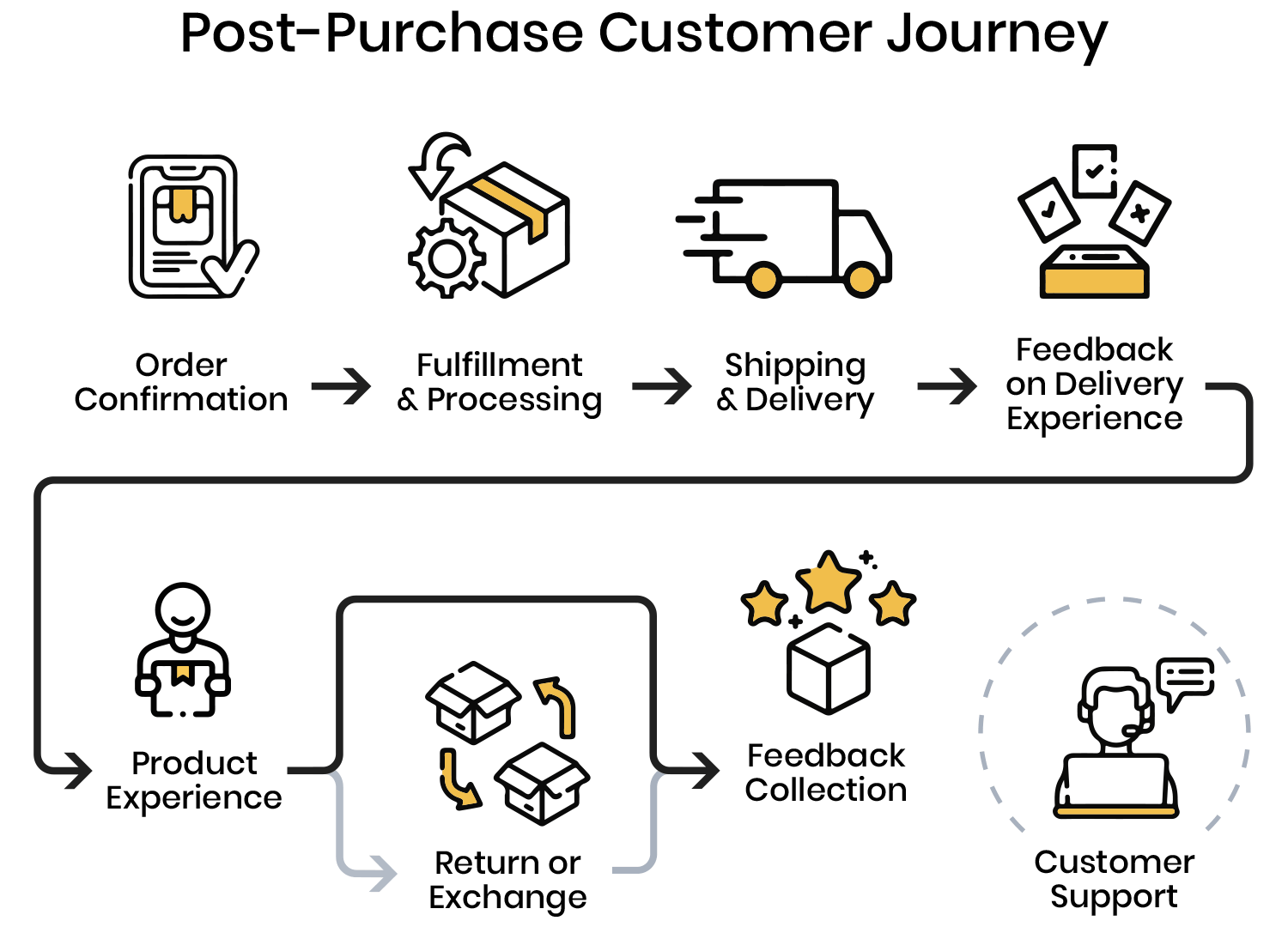
Core Stages in the Post‑Purchase Journey
- Order confirmation – “Was my order received? Did payment go through?”
- Processing and fulfillment – “When will it ship?”
- In‑transit tracking – “Where is my order right now?”
- Delivery and handoff – “Did it arrive safely and on time?”
- Usage and support – “Does it work as expected? Can I get help easily?”
- Returns and exchanges – “If there’s a problem, how hard is it to fix?”
- Re‑engagement – “Do I feel good enough about this brand to buy again?”
2. Define Clear Objectives for Your Post‑Purchase Journey Map
Before drawing any boxes and arrows, define what “success” looks like. For higher customer satisfaction, your journey map should aim to reduce effort, increase clarity, and build trust in your brand.
Typical objectives include reducing “Where is my order?” queries, shortening time to resolution when issues occur, and increasing repeat purchase rates. Align these goals with your wider commerce strategy so improvements are measurable, not abstract.
Key Objectives to Consider
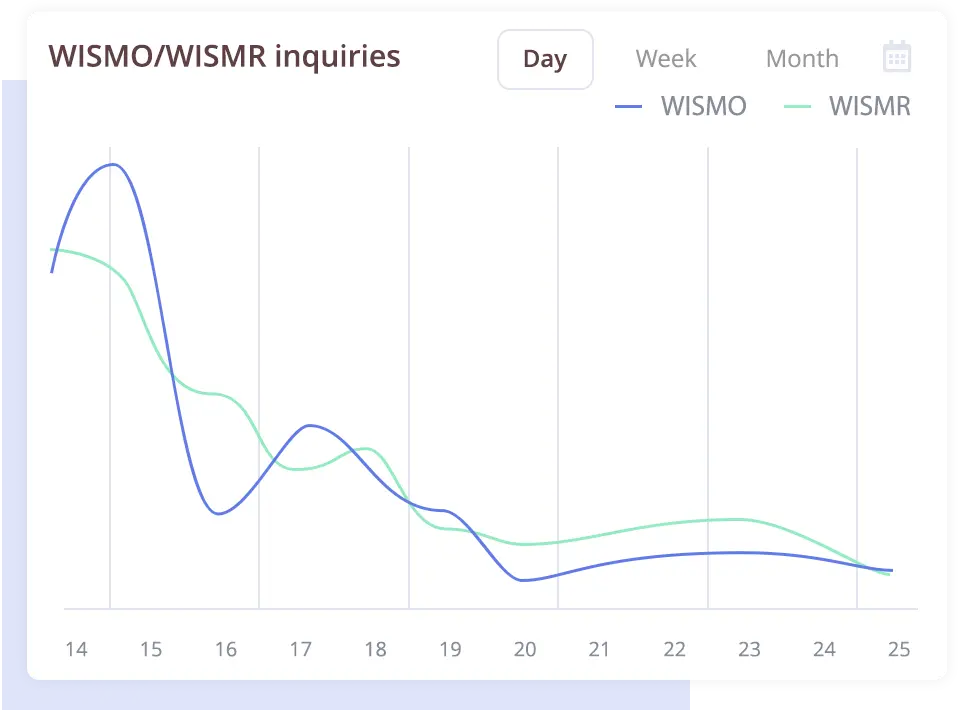
- Reduce WISMO contacts through better tracking and notifications.
- Increase perceived reliability with proactive delay alerts and realistic ETAs.
- Streamline returns so they feel predictable and low‑friction.
- Extend engagement with relevant tips, content, and offers after delivery.
3. Identify Every Post‑Purchase Touchpoint and Channel
A robust journey map lists each touchpoint where your customer interacts with your brand after buying. This includes visible interfaces and behind‑the‑scenes interactions triggered by shipment events.
List all your channels—email, SMS, tracking pages, account areas, chat, and support—and the events that trigger them, such as order confirmation, shipment creation, out‑for‑delivery, and delivery confirmation.
Common Post‑Purchase Touchpoints
- Order confirmation email or page
- Self‑service tracking portal linked from your site or emails
- Carrier or branded tracking page
- Proactive SMS and email notifications for key shipment events
- Help center, chat, or contact forms used when something goes wrong
- Returns or exchanges portal
4. Map Emotions, Expectations, and Pain Points at Each Step
To improve satisfaction, you must understand what customers feel and expect at each post‑purchase step. Your journey map should link every touchpoint to a likely emotional state and a clear expectation.
For example, when an order just shipped, customers expect tracking details that work and realistic delivery dates. When a shipment is delayed, they expect a proactive explanation and a clear new plan, not silence.
Capturing Emotions in Your Journey Map
For each stage, document:
- Customer goal – What are they trying to achieve?
- Current emotion – Excited, uncertain, anxious, annoyed, relieved, or pleased.
- Expectation – Timely updates, clear instructions, or fast problem‑solving.
- Frictions – Missing tracking, hard‑to‑find support options, unclear returns.
5. Build a Self‑Service Foundation with Order and Shipment Tracking
Self-service tracking is one of the most powerful levers for post‑purchase satisfaction. It gives customers control and reduces the need to contact support when they have a simple question about shipment status.
Solutions like the Self‑Service Order & Shipment Tracking product from WISMOlabs empower customers with real‑time visibility in a branded portal available 24/7. Instead of routing customers to carrier pages, you offer a consistent experience under your own brand.
What Strong Self‑Service Tracking Includes
- Real‑time shipment events with clear status descriptions.
- Searchable portal by order number, email, or tracking ID.
- Consistent branding across all tracking experiences.
- Mobile‑friendly design for on‑the‑go access.
6. Use Intelligent Notifications to Proactively Manage Expectations
Customers do not want to chase information. They want relevant updates pushed to them in the channels they trust. Intelligent shipment notifications let you automate this as part of your post‑purchase journey.
An event‑driven notification engine, like WISMOlabs’ Automated Shipment Notification Engine (Email, SMS & Webhooks), allows you to trigger messages at every critical milestone. You can tailor logic by carrier, destination, or customer segment while keeping all communications on‑brand.
Key Events to Include in Your Notification Journey
- Order confirmation
- Order shipped with tracking link
- Out for delivery
- Delivered
- Delay or exception notifications with a clear next step
7. Turn Tracking into a Branded, Revenue‑Generating Experience
Tracking pages attract repeat visits during the wait period, which makes them prime locations for branded experiences and relevant offers. Instead of redirecting customers to carrier sites, use a branded tracking portal that keeps them in your ecosystem.
WISMOlabs’ Branded Tracking Portal is designed specifically for this: it replaces generic pages with a white‑labeled interface where you control layout, messaging, cross‑sell placements, and content while still delivering accurate tracking information.
Best Practices for Branded Tracking Portals
- Keep tracking information central and clear so utility never suffers.
- Use on‑brand visuals and copy that reinforce your identity.
- Add helpful modules such as FAQs about shipping, returns, or care instructions.
- Introduce subtle recommendations related to the purchased items.

8. Personalize Post‑Purchase Engagement with a Marketing Engine
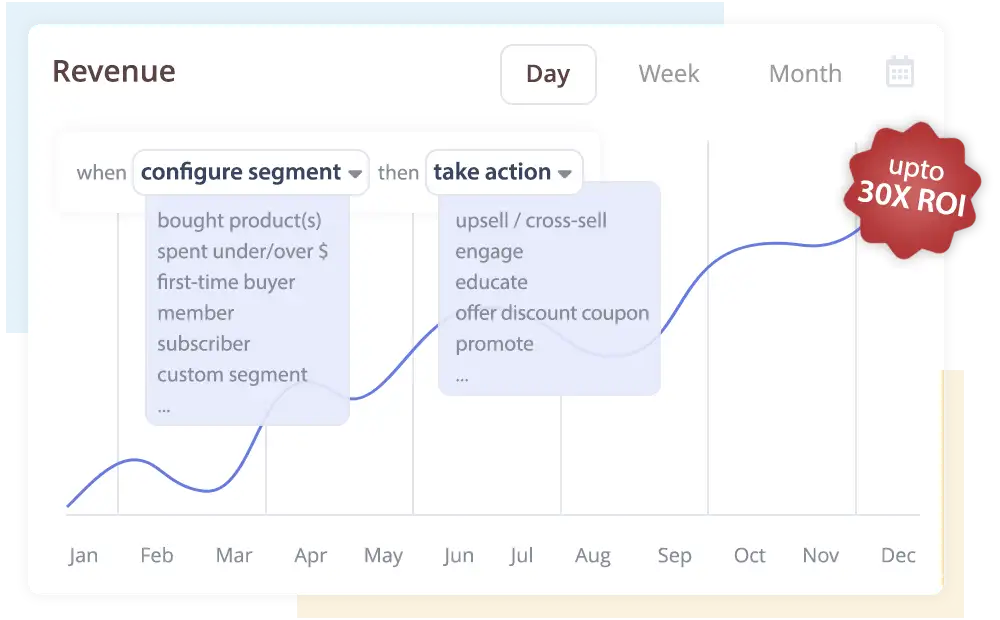
Once you have tracking and notifications in place, the next layer is personalized post-purchase engagement. This moves you from “order updates” to a tailored, value‑adding experience for each customer.
The WISMOlabs Post‑Purchase Marketing & Personalization Engine is built to do this. It uses segmentation and flexible rules to send different content, offers, and tips based on product type, purchase history, and customer behavior.
Examples of Personalized Post‑Purchase Journeys
- Care and setup sequences after delivery for complex products.
- Complementary product suggestions timed to usage, not just delivery.
- Replenishment reminders at predicted reorder intervals.
- Exclusive offers based on loyalty tier or purchase frequency.
9. Capture Journey Data with Customer Engagement Analytics
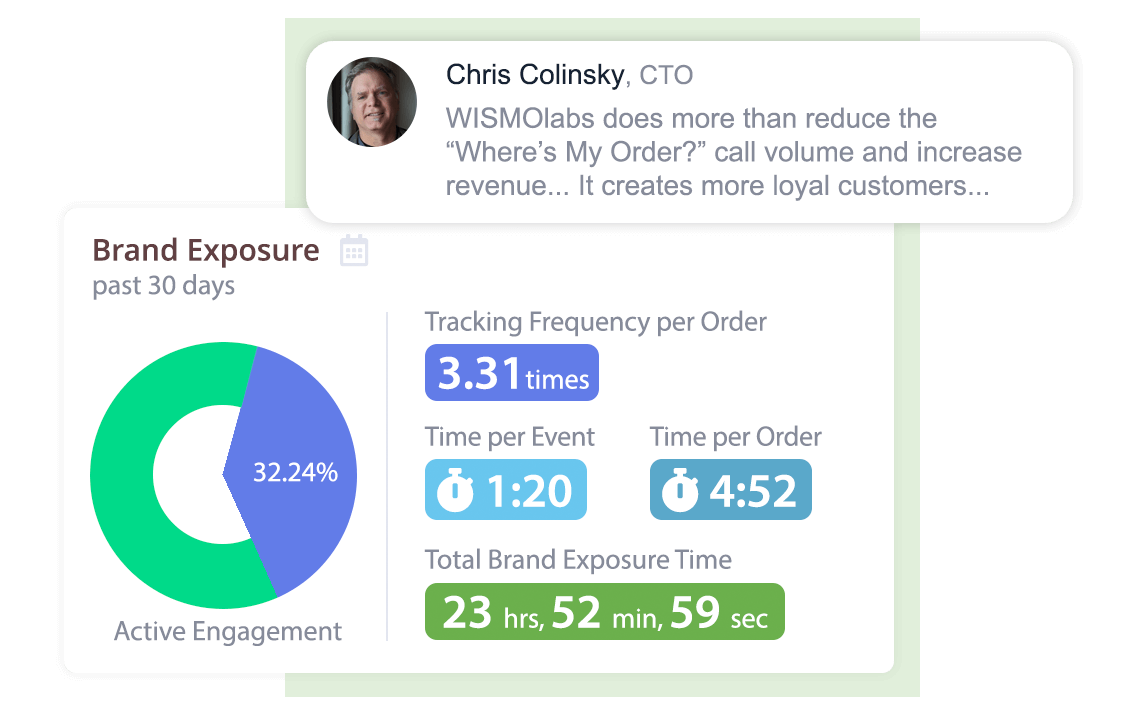
To keep improving your post‑purchase journey map, you need visibility into how customers interact with each touchpoint. Customer engagement analytics connect behavior across tracking pages, notifications, and marketing flows.
WISMOlabs’ Customer Engagement Analytics product tracks every banner click, message, and interaction so you can see which parts of your journey work and which need redesigning. This moves your journey mapping from assumption‑based to evidence‑based.
Metrics to Align with Your Journey Map
- Engagement – opens, clicks, and visits to tracking experiences.
- Operational impact – reduction in WISMO contacts, shorter case resolution times.
- Commercial outcomes – repeat purchases, cross‑sell revenue from tracking pages.
- Experience indicators – issue escalation patterns or repeated contact on the same order.
10. Integrate, Iterate, and Operationalize Your Journey Map
A post‑purchase journey map creates value only when it is integrated into your systems and processes. That means connecting your commerce platform, carriers, notification tools, tracking portals, and analytics into a coherent stack.
Pages like “How It Works” from WISMOlabs outline how shipment data flows into personalized tracking and notification experiences. Once your stack is connected, your journey map becomes a living asset that you refine regularly based on performance.
Steps to Operationalize Your Post‑Purchase Journey
- Document your initial map with touchpoints, emotions, and objectives.
- Connect your eCommerce, shipping, and post‑purchase experience platform.
- Automate key events with notifications and self‑service experiences.
- Measure engagement and satisfaction outcomes with analytics.
- Improve the journey every quarter based on clear data.
Conclusion
Mapping the post-purchase journey is one of the most effective ways to raise customer satisfaction because it forces you to see every step from the buyer’s perspective. When you chart emotions, expectations, and touchpoints from order confirmation to returns, gaps in communication and experience become clear and fixable.
A strong journey map rests on several foundations: self‑service tracking that actually works, intelligent notifications that keep customers informed, branded tracking portals that retain attention, personalization engines that add value after delivery, and analytics that show what is truly happening. Together, these elements turn a once‑overlooked part of commerce into a structured, measurable system that consistently meets customer needs.
If you treat your post‑purchase map as a living document—reviewed and refined regularly—it will guide product, operations, support, and marketing decisions for years. The result is a post‑purchase experience that feels predictable, helpful, and dependable from your customers’ point of view, and a business that benefits from higher satisfaction, stronger loyalty, and more repeat orders.